Free Video Logo Remover - Remove Logo from Video Online (AI)
Easily erase brand logos, channel icons, and watermarks from any video without blur. Our AI-powered tool removes TV channel bugs, recording software timestamps, and floating objects instantly. No software download required.
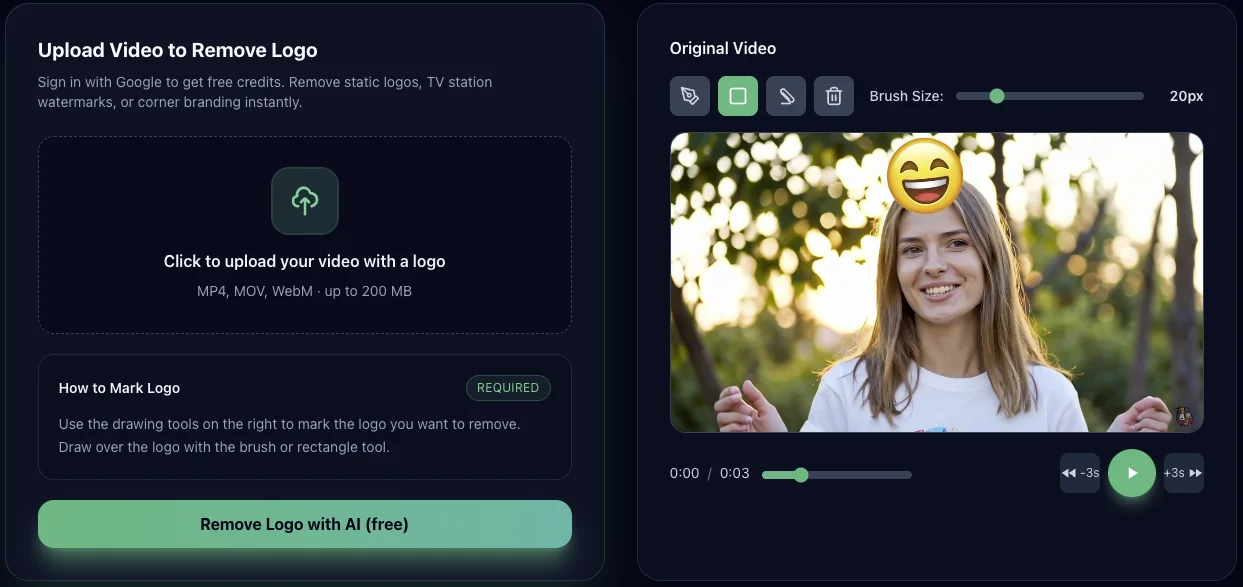
Upload Video to Remove Logo
Sign in with Google to get free credits. Remove static logos, TV station watermarks, or corner branding instantly.
💡 TIPS:
- • Drag the slider to compare before and after
- • Click to toggle original and processed
- • Press & hold to see the original video
No video uploaded yet
Upload a video to see the preview here
AI is analyzing and removing logos...
Uploading video
AI Analyzing frames
Detecting logos
Inpainting background
Exporting video
Loading comparison view...
How to remove a logo from a video for free?
Follow these simple steps to remove any logo or branding from your videos using AI
-
1.Upload Your Video
Click or drag your video file into the upload area. We support MP4, MOV, WebM formats up to 200MB. Your video will be previewed on the right side for the next step.
- Supports MP4, MOV, WebM formats
- Maximum file size: 200MB
- Maximum file size: 200 MB
- No account needed for anonymous upload
Video Upload Interface
Screenshot placeholder
-

Draw Mask Interface
Screenshot placeholder
2.Draw Over Logo
Use the brush tool to paint over the logo or branding you want to remove. You can adjust brush size, use rectangle selection for large areas, or eraser to refine. The white overlay marks what will be removed.
- Brush, rectangle, and eraser tools
- Adjustable brush size for precision
- Clear all or refine with eraser
-
3.AI Processing
Click "Remove Logo with AI" button. Our AI will analyze your video and intelligently remove the logo while preserving video quality. Processing typically takes 2-5 minutes depending on video length.
- AI-powered inpainting technology
- Processing takes 2-5 minutes
- Real-time progress updates

AI Processing Interface
Screenshot placeholder
-

Download Result Interface
Screenshot placeholder
4.Download Clean Video
Preview your logo-free video with our before/after comparison slider. Satisfied? Click "Download Video" to save your clean video in high quality. No watermarks added by our tool!
- Interactive before/after comparison
- Original quality preserved
- No watermarks added by our tool
Why use our Video Logo Remover?
Focused on logos
Tailored for static or corner logos, channel bugs, and brand marks.
AI inpainting
Fills the logo area frame by frame using contextual pixels.
No Installation Needed
Works on all devices (Windows, Mac, iPhone, Android) – no software download required.
What Can You Erase with Our AI Tool?
Remove Screen Logos & TV Station Watermarks
Instantly erase static TV channel logos (like CNN, BBC), news banners, and watermarks from recording clips.
Clear Text, Subs & Captions
Get rid of hardcoded subtitles, subs, closed captions, and unwanted text overlays without blurring the background.
Delete Logo Animations & Moving Objects
Our AI automatically tracks and deletes logo animations, floating emojis, stickers, and dynamic watermarks that move across the screen.
Wipe Date & Time Stamps
Clean up digital date stamps, time counters, and camera recording info from old home videos or CCTV footage.
No Sign Up Required
Start removing logos instantly. No sign up, no email, and no installation required. Just upload and edit.
AI Quality Retention (No Blur)
Unlike basic blur tools, we use AI Inpainting to reconstruct the hidden pixels, keeping your video HD and artifact-free.
Remove Emojis & Stickers from Video
Easily remove emojis, stickers, and overlays from TikTok, Instagram, Snapchat, and other social media videos using our AI-powered tool. Perfect for cleaning up reposts, removing watermarks with emojis, or creating professional content from social media clips.
TikTok Emojis
Remove emojis added by TikTok creators, including laugh emojis, reaction faces, and custom sticker overlays from downloaded videos.
Animated Stickers
Delete moving stickers, GIF overlays, and animated decorations that appear on Instagram Reels, YouTube Shorts, and other platforms.
Eye-Covering Emojis
Remove privacy-protection emojis covering faces, eyes, or sensitive information from videos you want to repurpose.
When should you remove a logo from your video?
For Content Creators: Rebranding
Replace outdated logos on older intros and bumpers without re-editing the entire project.
For Agencies: Client Material Reuse
Reuse agency demo reels or showreels for multiple clients by cleaning old brand marks.
For Influencers: TikTok/Reels Repurposing
Remove logos before turning long-form videos into TikTok, Reels, or Shorts.
Training & internal use
Clean external branding from training videos used inside your company.
Frequently Asked Questions
Everything you need to know about removing logos from videos